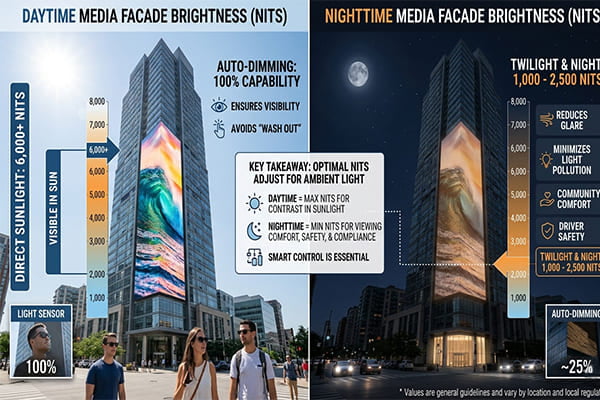
How Do You Perfectly Balance Brightness, Pixel Pitch, and Resolution for a Media Facade?
Designing a media facade is a high-stakes game. If you get the balance wrong, you end up with a blurry mess, a screen that’s invisible in daylight, or a blinding glare at night. It's a huge, expensive mistake that wastes the client’s investment and reflects poorly on everyone involved.
To perfectly balance a media facade, first determine the primary viewing distance to select the right pixel pitch. Then, assess the ambient light (day vs. night) to set the required brightness. Finally, choose the resolution and control protocol based on the facade’s total size and content complexity.
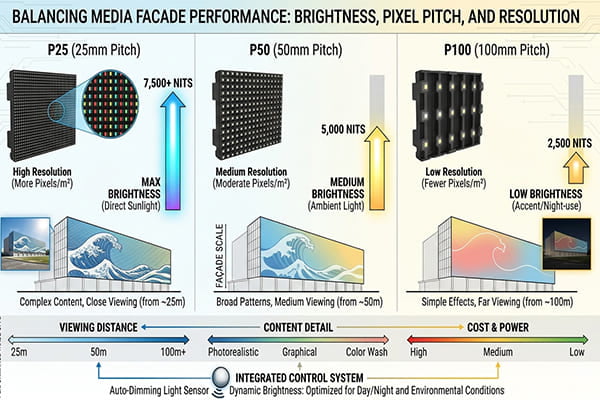
This isn't about guesswork. It's about a clear, logical process that I use on every large-scale project. It starts not with the technology, but with the audience. Where will people be standing when they look at your building? Once you answer that, the other pieces fall into place. Let’s walk through the three critical decisions you need to make.
How Bright Does My Media Facade Need to Be?
Your brand new media facade looks stunning... until the sun comes up and it completely disappears. Or worse, it looks great during the day but becomes a source of angry calls from neighbors at night. This isn't just an aesthetic problem; it’s a functional failure that wastes energy and creates light pollution.
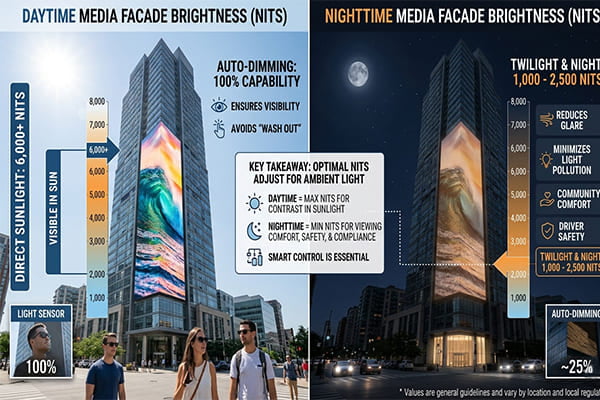
A media facade needs 5,000-10,000 nits (cd/m²) for daytime visibility against sunlight1. For nighttime-only use, 600-2,000 nits is ideal to prevent glare2. I always recommend using auto-dimming sensors or specifying a night-only screen to manage this effectively.
The Day vs. Night Dilemma
Brightness, measured in nits, is the raw power of your display. During the day, you are competing directly with the sun. To be visible, you need a very high brightness level, typically over 5,000 nits. But if you run that same brightness level at night, your facade will become a public nuisance. It will create dangerous glare for drivers and shine into nearby buildings3.
The professional solution is an automated system. We install light sensors that measure the ambient brightness and automatically adjust the facade's output4. As the sun sets, the screen dims down to a comfortable nighttime level, usually between 600 and 2,000 nits.
The Cost-Effective Night-Only Strategy
What if the facade only needs to run at night? Many projects are designed to create a vibrant nighttime atmosphere. In these cases, specifying a high-brightness, daytime-rated screen is a waste of money. Instead, I recommend a screen specifically designed for nighttime use. These fixtures are less expensive, consume less power, and often have a longer lifespan because they don't have to handle the extreme heat generated by high-brightness LEDs. It’s a smarter use of the budget that delivers a better long-term result.
Don't Forget Heat Dissipation
High brightness equals high heat. For daytime-rated screens, effective heat dissipation is non-negotiable. Poor thermal management will drastically shorten the life of the LEDs and lead to color shifts5. Ensure the system design includes adequate ventilation or other cooling mechanisms.
| Environment | Required Brightness (Nits) | Key Consideration |
|---|---|---|
| Direct Sunlight | 5,000 – 10,000+ | Must overcome solar glare. Heat dissipation is critical. |
| Shaded Outdoor | 2,000 – 4,000 | Still needs significant punch, but less than direct sun. |
| Nighttime Urban | 600 – 2,000 | Must be bright enough to stand out, but dim enough to avoid glare. |
| Nighttime Rural | 200 – 600 | Lower ambient light requires much lower brightness levels. |
How Do I Choose the Right Pixel Pitch?
You picked a pixel pitch, but the image is either a coarse, pixelated grid from up close or you paid a fortune for a high-resolution screen that looks the same as a cheaper one from a distance. A wrong choice here means you either deliver a poor visual result or you waste a huge portion of the budget on pixels nobody can even see.
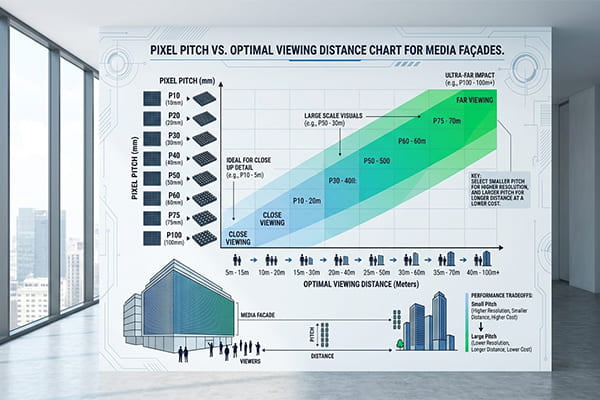
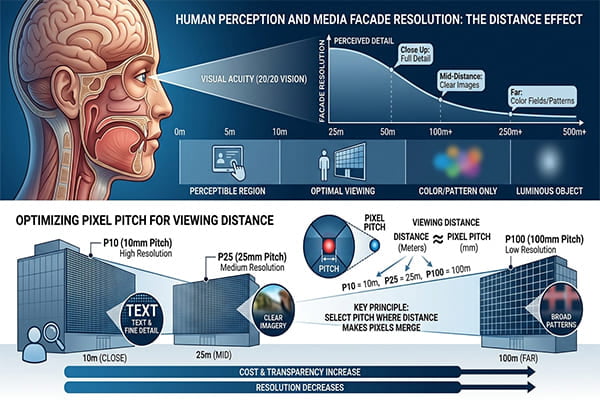
Choose your pixel pitch based on the minimum viewing distance. A simple and reliable rule of thumb I use is: Minimum Viewing Distance (in meters) ≈ Pixel Pitch (in millimeters)6. For a P100 screen, the ideal viewing distance is around 100 meters.
The Distance-to-Pitch Rule
Pixel pitch (or "P-value") is the distance from the center of one pixel to the center of the next7. A smaller number means the pixels are closer together, creating a more detailed image. A larger number means the pixels are farther apart, which is suitable for viewing from a long distance.
The human eye can only resolve a certain amount of detail from a distance8. Paying for a super-fine P25 screen on a skyscraper that will only be seen from 300 meters away is a complete waste. The eye will blend the pixels together, and it will look no different than a much cheaper P100 screen. This simple distance rule works incredibly well for screens over 20 square meters and prevents you from over-specifying.
Matching Products to Pitch
The right product also depends on the pitch. For finer pitches, a mesh screen works well. For very large, coarse pitches, individual point sources are more cost-effective. Here are my typical recommendations:
- P25 – P100: Use a grid-like mesh screen product.
- P100 – P125: Use 3cm point sources or pixel-controlled linear lights.
- P150 – P250: Use larger 4cm or 5cm point sources.
- P250+: Use very large point sources (8cm, 12cm, or more).
A Real-World Example from Doha
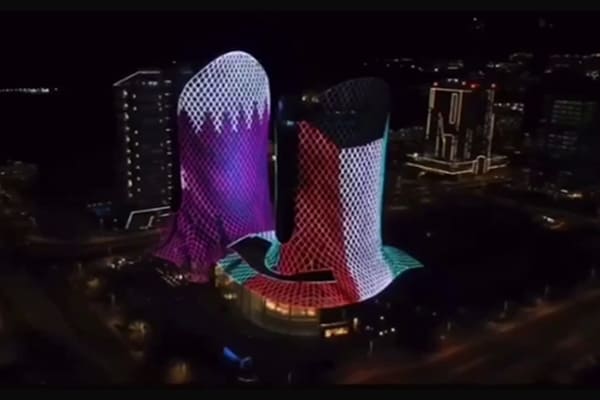
On a massive project in Doha, the main viewing distance was about 200 meters. According to my rule, we needed a pixel pitch around P200. We designed the facade using 5cm point sources arranged in a P200 grid. The result was a stunning success. From the street, the image was clear and vibrant, and the client didn't pay for unnecessary pixel density.
| Pixel Pitch (P-Value) | Optimal Viewing Distance | Recommended Product |
|---|---|---|
| P25 – P100 | 25 – 100 meters | LED Mesh Screen |
| P100 – P125 | 100 – 125 meters | 3cm Point Source / Linear Lights |
| P150 – P250 | 150 – 250 meters | 4cm or 5cm Point Source |
| > P250 | > 250 meters | 8cm, 12cm+ Large Point Source |
What Is Visual Resolution and How Does It Affect My Design?
Your facade has a high physical pixel count, but the content still doesn't look clear. You’ve spent a fortune on thousands of pixels, but the final image lacks impact or looks muddy from the intended viewing distance. The problem is you focused on the wrong kind of resolution.
Visual resolution is the perceived clarity of an image from a specific distance9. It’s a combination of pixel pitch, total screen size, and content design. For large-scale facades, focus on bold, high-contrast content and overall impact rather than fine detail.
Physical vs. Visual Resolution
Physical resolution is just the total number of pixels on your screen (e.g., 1920x1080). Visual resolution is what the human eye actually perceives from the street. On a massive building facade, you will never see individual pixels. Instead, the eye blends them together. This means simple, bold, high-contrast graphics and videos work much better than complex, detailed content10.
For most large facades, especially those with coarse pixel pitches, the goal isn't to show a perfect HD movie. It's to create an emotional impact with color, movement, and bold patterns.
Choosing the Right Control Protocol
The total pixel count has a big impact on your control system. The two main protocols I use are DMX and SPI.
- DMX512: This is a robust and reliable industry standard. However, each DMX universe can only control a limited number of pixels (170 RGB pixels)11. It's great for smaller installations or facades with a very large pixel pitch where the total pixel count is manageable.
- SPI: This protocol is built for speed and can handle a much higher density of pixels. It’s my choice for large, high-resolution media facades where you need to send vast amounts of data quickly to create smooth video effects.
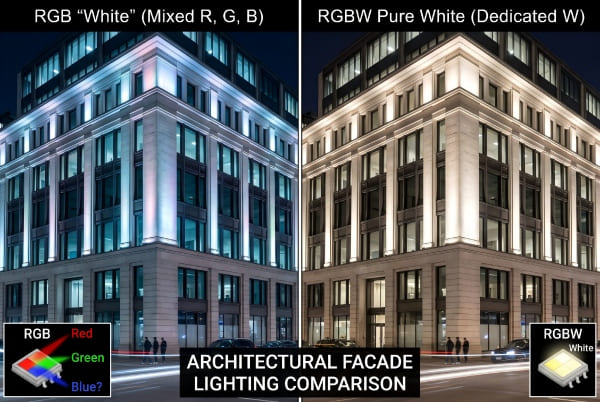
For special effects, I often specify RGBW pixels instead of standard RGB. The dedicated white chip creates a purer, brighter white and a wider range of pastel colors12, which can really enhance the visual brightness and color quality. For simple holiday animations, a standard SPI-controlled RGB system is usually more than enough.
| Protocol | Best For | Pixel Capacity | Pros / Cons |
|---|---|---|---|
| DMX512 | Small to medium facades, coarse pitch | Low (170 RGB pixels per universe) | Pro: Very stable, industry standard. Con: Low capacity, complex wiring. |
| SPI | Large, high-density facades, video | High (many thousands per controller) | Pro: Fast, high capacity, simple wiring. Con: Less standardized. |
Conclusion
A successful media facade is not about having the brightest screen or the smallest pixel pitch. It is about creating a perfect balance tailored to the specific project. Always start with the viewer, and let their perspective guide your technical decisions.
"Sunlight Readable LCD Technology & Selection Guide", https://www.risinglcd.com/news/sunlight-readable-lcd-technology-selection-guide.html. Outdoor-display luminance guidance and technical literature on LED signage support that daylight-readable exterior displays generally require luminance in the several-thousand cd/m² range to remain visible under high ambient illumination. Evidence role: statistic; source type: institution. Supports: A media facade needs 5,000-10,000 nits (cd/m²) for daytime visibility against sunlight.. Scope note: Exact required luminance varies with solar exposure, screen contrast, viewing angle, content, and local dimming rules; the cited range should be treated as design guidance rather than a universal threshold. ↩
"415 ILCS 200/10", https://www.ilga.gov/documents/legislation/ilcs/documents/041502000K10.htm. Lighting-environment guidance on nighttime luminance, glare, and obtrusive light supports reducing exterior display brightness after dark to mitigate visual discomfort and environmental impact. Evidence role: expert_consensus; source type: institution. Supports: For nighttime-only use, 600-2,000 nits is ideal to prevent glare.. Scope note: Most standards specify limits by zone, adaptation state, viewing geometry, or illuminance at receptors rather than prescribing a single universal 600–2,000 cd/m² display range. ↩
"Nighttime Visibility Overview | FHWA - Department of Transportation", https://highways.dot.gov/safety/other/visibility/nighttime-visibility-overview. Road-safety and obtrusive-light guidance recognizes that bright illuminated signs and exterior lighting can cause disability or discomfort glare for drivers and unwanted light trespass into nearby properties. Evidence role: general_support; source type: government. Supports: Excessive nighttime media-facade brightness can create dangerous glare for drivers and shine into nearby buildings.. Scope note: Such guidance establishes the risk mechanism but does not prove that every media facade operated at daytime brightness will create a hazardous condition. ↩
"Lighting Controls | Department of Energy", https://www.energy.gov/energysaver/lighting-controls. Research and engineering references on adaptive lighting systems describe the use of ambient-light sensors and closed-loop controls to vary LED output in response to changing environmental illumination. Evidence role: mechanism; source type: research. Supports: Automated light sensors can measure ambient brightness and adjust a media facade’s output.. Scope note: The source would support the control principle generally; implementation details for a specific media facade depend on controller design, calibration, and local lighting limits. ↩
"[PDF] Thermal Management of White LEDs - eere.energy.gov", https://www1.eere.energy.gov/buildings/publications/pdfs/ssl/thermal_led_feb07_2.pdf. LED reliability studies show that elevated junction temperature accelerates lumen depreciation and can alter chromaticity, supporting the need for thermal management in high-output LED systems. Evidence role: mechanism; source type: paper. Supports: Poor thermal management can shorten LED life and lead to color shifts.. Scope note: The magnitude of lifetime reduction or color shift depends on package design, drive current, ambient temperature, and heat-sink performance. ↩
"[PDF] Recommended Viewing Distance & Direct View LED - Planar", https://www.planar.com/media/439462/understanding-viewing-distance.pdf. Display-design guidance based on normal visual acuity supports the common rule of thumb that larger pixel pitch requires proportionally longer viewing distance for pixels to blend visually. Evidence role: mechanism; source type: education. Supports: Minimum viewing distance in meters can be approximated by pixel pitch in millimeters.. Scope note: This is a heuristic derived from visual-acuity assumptions; acceptable viewing distance also depends on content, contrast, viewer eyesight, and whether the design prioritizes video detail or abstract effects. ↩
"Pixel density - Wikipedia", https://en.wikipedia.org/wiki/Pixel_density. Display-engineering references define pixel pitch as the center-to-center distance between adjacent pixels, supporting the article’s terminology. Evidence role: definition; source type: encyclopedia. Supports: Pixel pitch is the distance from the center of one pixel to the center of the next.. ↩
"Visual Acuity by Michael Kalloniatis and Charles Luu - Webvision", https://www.webvision.pitt.edu/book/part-viii-psychophysics-of-vision/visual-acuity/. Human-vision literature establishes that angular resolution limits the ability to distinguish fine spatial detail, providing the perceptual basis for selecting coarser pixel pitch at longer viewing distances. Evidence role: mechanism; source type: paper. Supports: The human eye can resolve only a limited amount of detail from a given distance.. Scope note: The often-cited one-arcminute acuity value is an approximation for observers with normal vision under favorable contrast and illumination. ↩
"Resolution limit of the eye — how many pixels can we see?", https://pmc.ncbi.nlm.nih.gov/articles/PMC12559231/. Perception and display-quality literature relates perceived image sharpness to viewing distance, angular pixel density, contrast, and visual acuity, supporting the distinction between physical pixel count and perceived clarity. Evidence role: definition; source type: research. Supports: Visual resolution is the perceived clarity of an image from a specific distance.. Scope note: “Visual resolution” is used here as a practical design concept rather than a single standardized metric with one universal definition. ↩
"[PDF] Text Legibility and Readability of Large Format Signs in Building ...", http://idea.ap.buffalo.edu/wp-content/uploads/sites/110/2019/08/11.pdf. Visual-perception and signage-legibility research indicates that contrast, simple forms, and reduced visual complexity improve recognition at distance, supporting the recommendation for bold media-facade content. Evidence role: expert_consensus; source type: research. Supports: Simple, bold, high-contrast graphics and videos work better than complex, detailed content on large facades viewed from a distance.. Scope note: The evidence is contextual because optimal content also depends on motion, dwell time, viewing angle, artistic intent, and local urban conditions. ↩
"DMX512 - Wikipedia", https://en.wikipedia.org/wiki/DMX512. The DMX512 standard defines 512 control slots per universe; because an RGB pixel typically uses three channels, this yields a maximum of 170 full RGB pixels with two unused slots. Evidence role: mechanism; source type: institution. Supports: Each DMX universe can control 170 RGB pixels.. Scope note: This calculation assumes one 8-bit DMX channel per red, green, and blue component; fixtures with RGBW, 16-bit control, or additional functions require more channels per pixel. ↩
"Development of the RGB LEDs color mixing mechanism for stability ...", https://pubmed.ncbi.nlm.nih.gov/26444810/. Color-mixing literature on RGBW LED systems shows that adding a white emitter can improve white-point rendering and expand achievable low-saturation colors compared with RGB-only mixing. Evidence role: mechanism; source type: paper. Supports: A dedicated white chip in RGBW pixels can create a purer, brighter white and a wider range of pastel colors than standard RGB.. Scope note: Actual brightness, color purity, and gamut depend on the spectral power distributions of the LEDs, calibration, drive current, and optical design. ↩